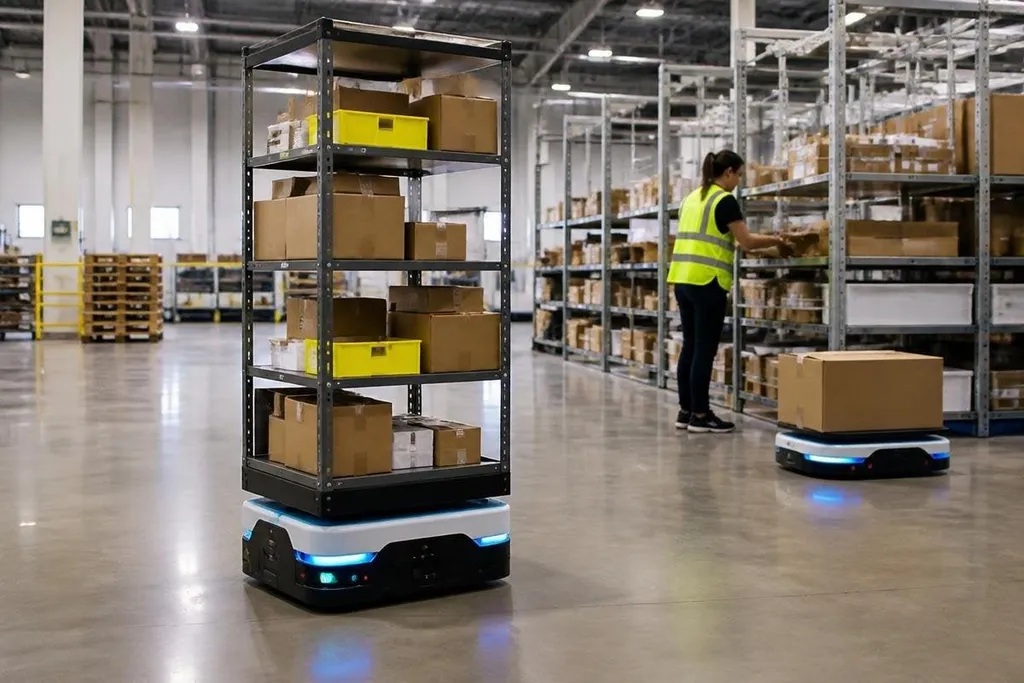
Warehouse robots now handle more than moving boxes from one point to another. They can bring shelves to workers, scan goods, move pallets, and work with software that assigns tasks across a site. The change matters most where walking, waiting, and repeated lifting take up a large share of each shift.
- Mobile robots carry stock between storage and picking areas.
- Cameras, barcode readers, and LiDAR help robots locate goods and people.
- The main limit is still task range: many robots work well in set conditions, then need help when the scene changes.
From transport to task work
The first warehouse robots often had a narrow job: move a load along a known route. Many current autonomous mobile robots, or AMRs, can map their work area, avoid obstacles, and choose another route when a path is blocked.
A warehouse team can send a new task without laying down a fixed rail or changing the floor.
That change cuts the link between one robot and one route. A fleet manager can assign several robots to storage runs during one part of a shift, then send them to packing areas when demand changes. The software still needs clear rules, good maps, and safe speed limits, so autonomy does not remove the need for site planning.
Robot arms add another layer. A mobile base can carry an arm to a work station, where the arm picks items from a bin or places them into a tote. Cameras help locate an item, while a gripper applies force to hold it without crushing it. These tasks remain easier when products have known shapes and the bins stay in a fixed position.
The systems behind the robot
A robot's movement is only one part of the job. Warehouse software must know which order needs work, where the goods are stored, and which robot has enough battery or space for the next run. The robot then sends back status data, such as its position, load, and task state.
Sensors give the robot a view of its surroundings. LiDAR measures distance with light pulses, while cameras can read labels or help identify the shape of an object. Barcode scans add a check before a robot moves a tote to the wrong station. Each sensor has limits, so sites often combine them instead of trusting one input.
A warehouse robot’s value shows up at the handoff, where sensors, software, and workers must agree on the next move. Dated warehouse robot reports from Robot24.com can help you judge the full task instead of a short demo, before the article looks at where these systems help most.
Where automation helps most
The best fit is a task with a clear goal, repeatable steps, and enough volume to justify setup work. Moving totes between fixed stations is easier to automate than picking mixed objects from a crowded shelf. Pallet movement is easier when the floor is level and the load stays within a known size and weight range.
Automation also changes the shape of human work. People may spend less time walking or lifting and more time checking exceptions, loading stations, or fixing items that the robot cannot identify. That shift only helps if the new work is safe, trained, and planned before the machines arrive.
I’d judge a warehouse robot by its failure handling before its fastest run. A blocked aisle, missing label, low battery, or damaged carton tells you more about daily value than a clean demo path.
What still needs proof
Robots can struggle with clutter, reflective surfaces, changing light, loose packaging, and goods that differ from the examples used during setup. A robot arm may pick one box well and fail when the next box has a soft bag, a damaged label, or an unexpected angle.
The cost also reaches beyond the robot. A site may need charging points, network coverage, floor changes, safety barriers, software links, staff training, and service work. A purchase price without those items gives you an incomplete budget.
Before choosing a system, use this checklist:
- Define the task: record the load, route, cycle time, and handoff point.
- Test the exceptions: include blocked paths, missing labels, mixed packaging, and low battery.
- Check the site: measure aisle width, floor condition, lighting, network coverage, and charging space.
- Set the human role: state who clears faults, loads stations, and approves a restart.
- Count the full cost: include software, installation, training, service, and spare parts.
- Set a pass mark: choose the speed, error rate, and recovery time the system must meet.
Warehouse automation advances when these details connect. The next useful step for a buyer is a live trial on the actual floor, with normal stock and normal exceptions. If the robot can recover without constant help, the project has a case; if it cannot, the limitation is already visible before the order.